
How Do I Track What My Bathroom Renovation Cost on iPhone?
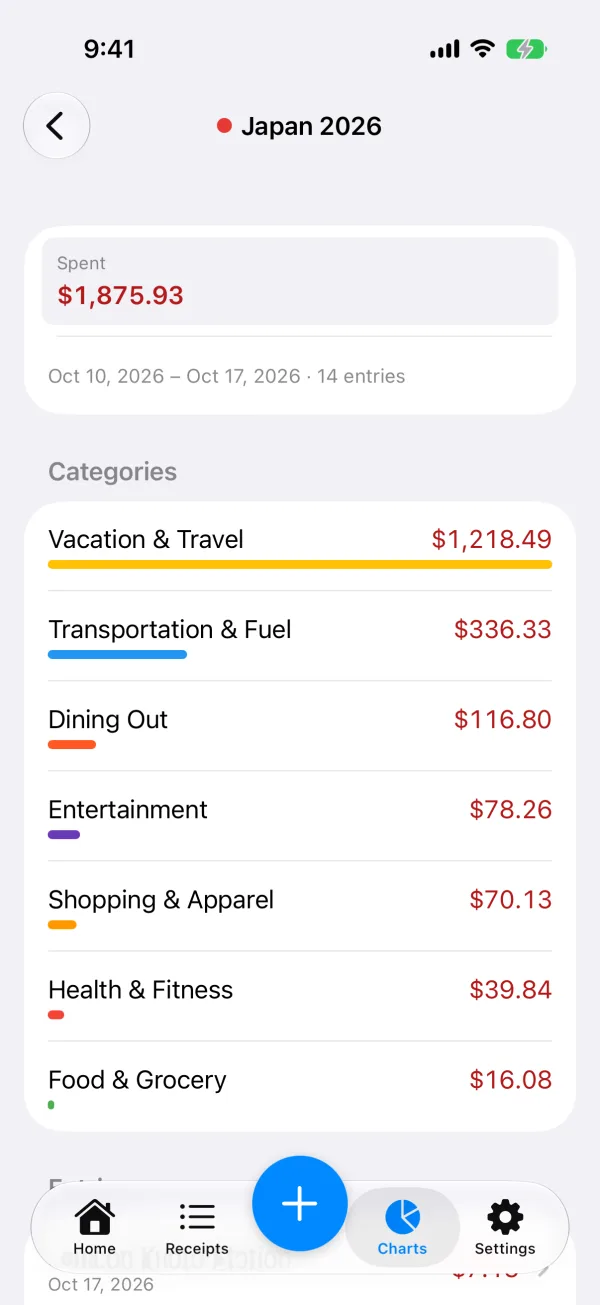
Short answer: turn on Tags in ReceiptIQ AI, make one tag for the job (for example “Bathroom reno”), and tag every receipt and invoice that belongs to it. Charts then shows what the whole renovation cost on its own page, with the total and a breakdown by category. No bank link and no account.
By Xinzhou Liu, maker of ReceiptIQ AI · Updated November 6, 2026
Why a renovation is hard to see in a normal budget
A renovation is spread over weeks of small purchases: tile and grout from one store, a vanity from another, a plumber’s invoice, a cash payment to the person who laid the floor. In a normal budget these land in Home, Shopping and Others next to everything else you bought that month, so “what did the bathroom cost?” has no single answer. A tag gives the job its own page.
Set it up in a minute
- Turn Tags on. They are off by default. Open Settings, then Tags.
- Name the job. For example “Bathroom reno”.
- Tag as you add. Choose “Tag new entries” and everything you scan, type or import from then on gets the tag. Switch it off when the work is done.
- Catch up on earlier purchases. In Receipts, select the entries that belong to the job and tap Tag.
- Open Charts (Insights on the Mac). The tag has its own page.
Receipts, invoices and cash
- Store receipts: photograph them, and every line item is read and sorted into a category, so tiles and paint are not buried in one lump.
- Contractor invoices: photograph the invoice like a receipt, or type the amount in yourself.
- Cash payments: type the entry in by hand. Typed entries are always free and do not count toward the 30 free AI-read receipts.
Your normal totals and budgets stay complete
Tagged entries still count in your usual totals and budgets. If you have a monthly Home or Shopping budget, the renovation spending is still in it; the tag only adds a second view that adds up the job. Nothing is hidden or moved out of your numbers.
Honest limits
- This is not project-management or accounting software: there are no quotes, estimates or invoices to send, and it does not compare a plan with actual cost.
- The app does not decide which costs are deductible or claimable. It adds up what you tagged.
- A photo that is blurry or cut off can mis-read a line. You can correct any entry after scanning.
Questions
How do I track what a bathroom renovation cost on iPhone?
Turn on Tags in ReceiptIQ AI (Settings, Tags; they are off by default), make a tag such as Bathroom reno, and tag every receipt and invoice for the job. Charts then gives that tag its own page with the total spent, the date range and a breakdown by category.
Can I tag receipts I already saved?
Yes. In Receipts, select several entries and tap Tag. For new ones, Tag new entries tags everything you add until you turn it off.
Do tagged renovation costs still count in my monthly budget?
Yes. Tagged entries still count in your usual totals and budgets. The tag is a label that gives the job its own page; it does not take the spending out of your numbers.
Can I add a contractor invoice or a cash payment?
Photograph the invoice like a receipt, or type the amount in by hand. Typed entries are always free and do not count toward the 30 free AI-read receipts.
More: receipts for landlords, one category per property, tracking a trip’s cost the same way, and Tags in the feature list.
Try ReceiptIQ AI free — your first 30 AI scans cost nothing, no account required, no bank link.
Download on the App StoreNot sure yet? Try one receipt in the browser first.