
How Much Did My Trip Cost? Track It in One Place on iPhone
Short answer: before you leave, turn on Tags in ReceiptIQ AI (they are off by default), name the trip, and choose “Tag new entries”. Everything you scan or type on the trip gets the tag. When you are home, Charts shows what the whole trip cost on its own page, in your home currency. No bank link and no account.
By Xinzhou Liu, maker of ReceiptIQ AI · Updated November 6, 2026
Before you leave
- Set your home currency, so foreign receipts convert to it.
- Turn on Tags: Settings, then Tags. They are off by default.
- Create a tag named for the trip, for example “Japan 2026”, and choose “Tag new entries”.
During the trip
- Scan receipts after you pay. A receipt in yen, euros or pounds is converted to your own currency at that day’s rate, with the printed amount kept alongside it. Scanning needs a connection, so if the hotel Wi-Fi is poor, scan when you have signal.
- Cash with no receipt: type it in. Typed entries are free and work without a connection.
- Every entry you add gets the trip tag automatically.
When you are home
Open Charts (Insights on the Mac). The trip has its own page: the total spent, the dates it covers, the number of entries, and a breakdown by category, so you can see how much went to transport, food and shopping rather than one lump.
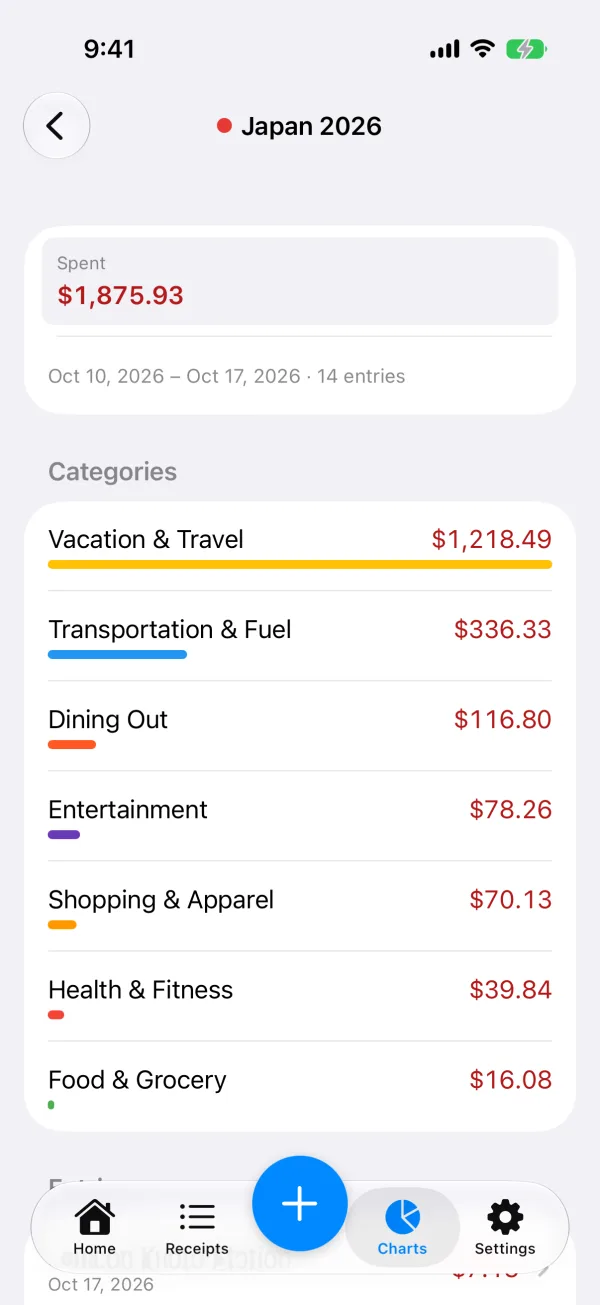
Forgot to switch it on, or booked flights and a hotel earlier? In Receipts, select those entries and tap Tag to add them to the trip.
The trip still counts in your normal numbers
Tagged entries still count in your usual totals and budgets. The trip page is an extra view, not a separate book: your monthly budget and charts include the trip spending too.
Honest limits
- The app reads what is printed. A blurry photo or a cut-off line can be mis-read; you can correct any entry afterwards.
- Card fees and exchange-rate differences charged by your bank are not on the receipt, so they are not in the total unless you add them as an entry.
- It adds up what you tagged and does not give tax or reimbursement advice.
Questions
How do I find out how much my trip cost?
In ReceiptIQ AI, turn on Tags (Settings, Tags; off by default), name the trip and choose Tag new entries before you leave. Everything you add on the trip gets the tag, and afterwards Charts shows the trip on its own page with the total and a breakdown by category.
Are receipts in a foreign currency converted?
Yes. A receipt printed in another currency is converted to your home currency at that day's rate, and the printed amount is kept alongside it, so the trip total is in one currency.
Does the trip still count in my monthly budget?
Yes. Tagged entries still count in your usual totals and budgets. The tag adds a page for the trip; it does not take the spending out of your normal numbers.
Can I add things I bought before the trip, like flights or a hotel?
Yes. In Receipts, select the entries and tap Tag. Anything without a receipt can be typed in by hand, and typed entries are free.
More: scanning receipts abroad, the Japan-trip story, and tracking a renovation the same way.
Try ReceiptIQ AI free — your first 30 AI scans cost nothing, no account required, no bank link.
Download on the App StoreNot sure yet? Try one receipt in the browser first.