Scan a receipt and ReceiptIQ AI reads every line, sorts your groceries into meat, snacks, vegetables and more, and shows where the month went. No bank link, no account.
ReceiptIQ AI is a receipt scanner app for iPhone, iPad and Mac that reads every line item, price, store and date from a paper receipt and files each item in a spending category, with no bank link and no account.
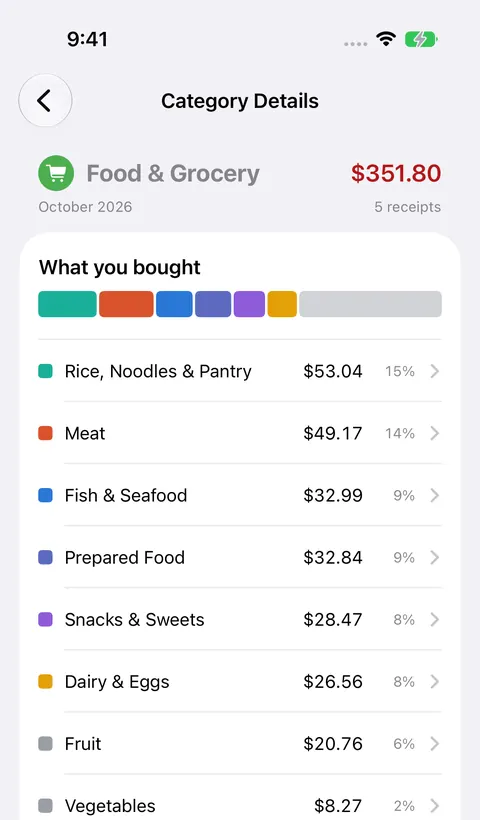
Left: a sample receipt made for this page. Right: the app's Food & Grocery breakdown (sample data).
A Winners receipt from Calgary, scanned with ReceiptIQ AI. Each item gets its own category, instead of the whole receipt landing in one.
One charge, one category. The bank never sees what was in the bag.
A real scan from September 28, 2026 (app 2.4.4). Items, prices and the total come out exactly as printed, and they add up to the paid $72.05.
Most households pay with a few credit cards and a checking account, sometimes a savings account too, often at different banks. Each bank app only sees its own slice. ReceiptIQ AI keeps every receipt in one place, however it was paid.
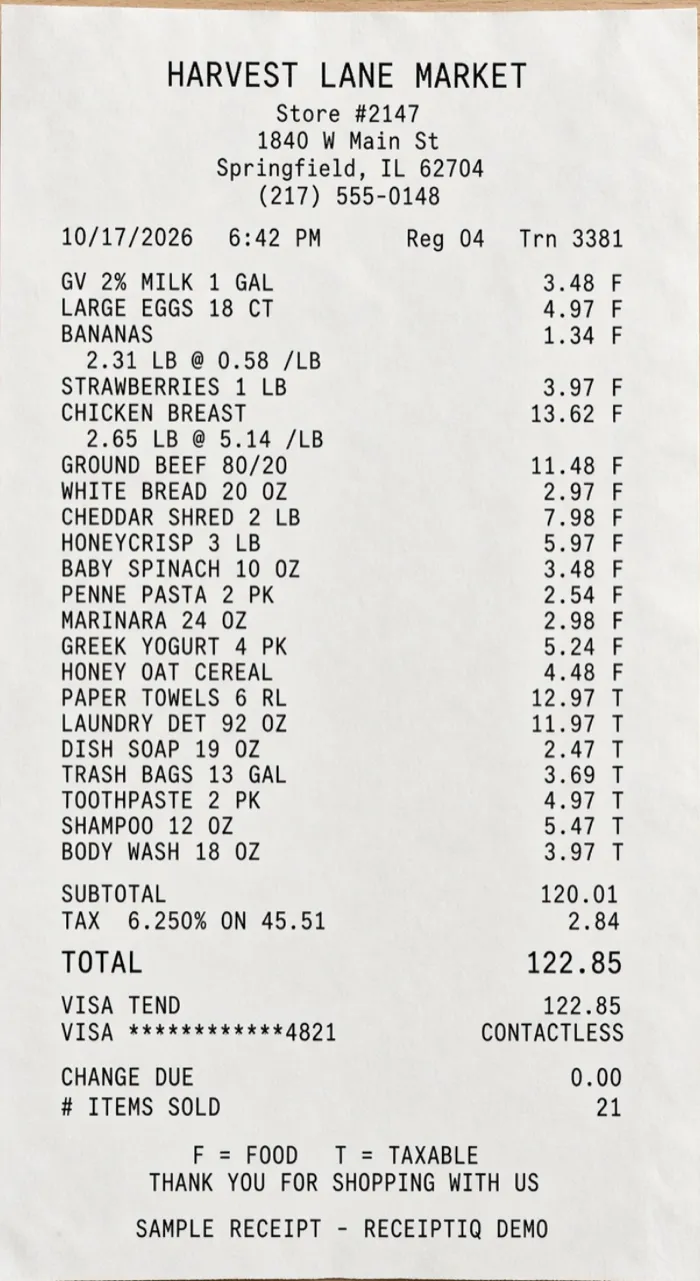
🔒 No bank linking: ReceiptIQ AI never asks for your bank login.One ordinary grocery run, 21 items. ReceiptIQ AI reads every line and sorts it into the right categories automatically, so the food, the household supplies and the toothpaste do not all pile up under “Groceries”.
One charge, one category. The bank never sees what was in the bag.
A sample receipt for a fictional store, scanned with ReceiptIQ AI on October 19, 2026. All 21 items and their prices came out as printed, and with tax they add up to the $122.85 total. How itemized grocery scanning works
Take a photo or upload one. A few seconds. In this web demo your photo is read once and deleted right away.
Scan on iPhone, review on iPad, organize on Mac, and check your spending on Apple Watch.
Scan paper receipts, add photos and PDFs, forward email receipts, or add an expense with your voice.
Explore the month by category and store on a big screen. Its camera scans receipts too.
Drag in PDFs, add photos and email receipts, review every transaction in a table, and explore insights. macOS 14.6 or later.
Check this period's spending total right from your wrist. Comes with the iPhone app.
Covers iPhone, iPad and Mac with the same Apple ID. The Watch app comes with the iPhone app.
Family Sharing syncs directly between devices when they are near each other. No server, no account.
Real screens from the app, with sample data.
When you scan, the receipt photo and its text are sent securely to be read, and nothing is kept on our servers. Your receipts and photos are stored only on your own devices. We never ask for a bank login, and there is no account to create.
US prices. The App Store shows the price in your currency.
ReceiptIQ AI or ReceiptIQ Lite? See the side-by-side comparison →
No. ReceiptIQ AI never asks for a bank login. Scan your receipts, or import a bank or credit card statement yourself as a PDF or a photo.
They are sent securely to be read and are not kept on our servers. Your receipts and photos are stored only on your own devices.
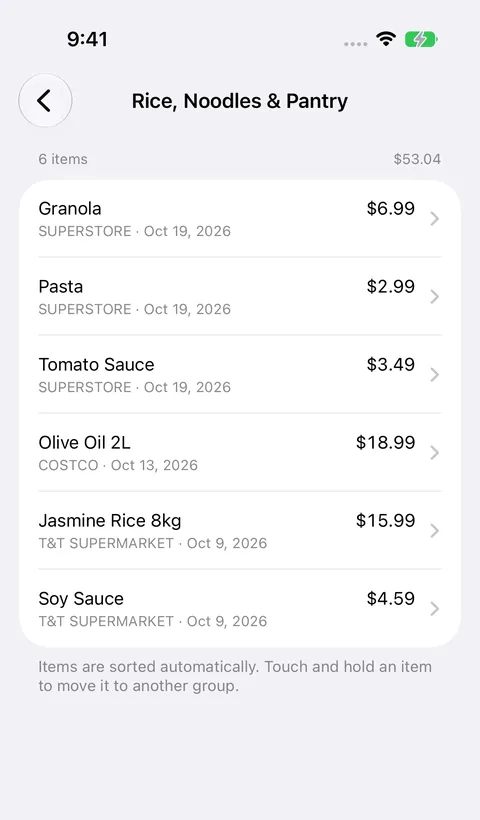
A receipt with item lines. Food & Grocery items are sorted into groups such as meat, snacks, dairy and vegetables, and you can move any item to another group.
The first 30 AI scans are free for life, counted per device. Each successful AI read counts once: a photo, a voice entry, a bank-statement PDF, or a forwarded email however many receipts it holds. Entries you type in yourself are always free, failed scans never count, and deleting a receipt does not give a scan back. No account and no card.
iPhone, iPad, Mac and Apple Watch. One purchase covers iPhone, iPad and Mac with the same Apple ID. iPhone and iPad scan with the camera, the Mac adds receipts from photos, PDFs, voice and email, and the Watch shows what you have spent this period.
Before every release, the scanner is checked against more than 500 receipts from 13 countries, including the United States, Japan, the Netherlands, Taiwan, Germany, Hong Kong and Canada. More than 400 of them are real photographed receipts; the rest are rendered test receipts, built where no real ones were available. If a change makes even one receipt come out wrong, the release is blocked until it’s fixed.
Choosing an iPhone receipt scanner? What to check before you pick one →
Japan: 家計簿アプリ · 領収書スキャン | Canada: GST, HST, PST & QST on receipts · TPS et TVQ
Discover our suite of beautifully designed, privacy-focused apps
Premium sleep sounds with brown noise, rain sounds, and binaural beats.
Smart warranty tracker with expiration reminders and receipt scanning.
Beautiful tip calculator with real-time bill splitting for groups.
Comprehensive mortgage calculator with affordability analysis.
Smart grocery lists with category organization and family sharing.
