
Apple Watch Expense Tracking: Track Spending on Your Wrist
Your wrist just became your most powerful expense tracking tool. ReceiptIQ AI's Apple Watch app brings full expense tracking capabilities to your wrist, making it faster and easier than ever to log expenses, check budgets, and stay on top of your spending - all without reaching for your phone.
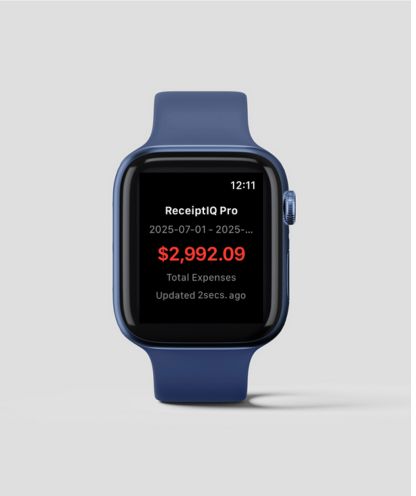
ReceiptIQ AI running natively on Apple Watch
Why Apple Watch for Expense Tracking?
Think about it: when do you usually need to log an expense? Right after making a purchase, when your phone is likely buried in your pocket or bag. Your Apple Watch is always accessible, always on, and perfect for quick interactions.
Lightning Fast Entry
Log expenses in under 10 seconds. Tap the complication, dictate the expense, and you're done. No fishing for your phone, no app launching delays.
Voice-First Design
Built for voice input from the ground up. Simply raise your wrist, tap, and speak: "Coffee five dollars" or "Business lunch forty-two fifty."
Smart Notifications
Get gentle reminders to log expenses, budget alerts when approaching limits, and daily spending summaries delivered right to your wrist.
Quick Insights
Glance at your wrist to see daily spending, remaining budget, or current month's expenses. Perfect for quick budget checks before purchases.
Real-World Apple Watch Scenarios
The Coffee Shop Experience
You're in line at Starbucks, hands full with your laptop bag and keys. After paying, instead of juggling everything to get your phone:
- Raise your wrist and tap the ReceiptIQ AI complication
- Speak: "Coffee and muffin, eight sixty-five"
- The expense is logged, categorized, and synced to your phone
Business Dinners
You're at a client dinner, and reaching for your phone would be rude. After the meal:
- Discreetly check your watch
- Use the Digital Crown to quickly input the amount
- Select "Business Meals" from the category list
- Add a voice note: "Client dinner with ABC Corp"
Travel Situations
Dragging luggage through an airport, your hands are occupied and your phone is buried. For taxi receipts, tips, or food purchases:
- Quick voice input without stopping
- Location tracking for expense context
- Automatic time zone adjustments
- Offline functionality when connectivity is poor
Key Apple Watch Features
Complications & Watch Faces
Add ReceiptIQ AI to your watch face for one-tap access:
- Circular complication - Shows current daily spending at a glance
- Corner complication - Quick expense entry shortcut
- Large complication - Budget progress bar and recent expenses
- Modular complications - Detailed spending breakdown by category
Voice Input Optimization
The Apple Watch app is optimized for natural speech patterns:
- Works in all supported languages (English, Spanish, Japanese, Chinese)
- Understands natural amounts: "five fifty" or "twenty-three dollars"
- Recognizes common merchants and auto-suggests categories
- Handles background noise better than typical phone apps
Haptic Feedback
Get confirmation through gentle taps on your wrist:
- Single tap when expense is successfully logged
- Double tap for budget alerts and warnings
- Series of taps for spending milestones
- Customizable haptic patterns for different notification types
Apple Watch App Features
⚡ Quick Actions
- Voice expense entry
- Digital Crown amount input
- Pre-set expense amounts
- Category quick select
📊 Insights
- Daily spending totals
- Budget progress bars
- Category breakdowns
- Spending trends
🔔 Notifications
- Budget limit alerts
- Expense reminders
- Daily summaries
- Goal achievements
⌚ Watch-Specific
- Multiple complications
- Haptic feedback
- Crown navigation
- Raise-to-wake support
Advanced Apple Watch Workflows
Siri Shortcuts Integration
Create custom Siri shortcuts for your most common expenses:
- "Hey Siri, log my coffee" - Automatically adds your usual coffee expense
- "Hey Siri, business meal" - Opens expense entry with business meal category pre-selected
- "Hey Siri, show my budget" - Displays current budget status and remaining amounts
- "Hey Siri, daily spending" - Shows today's total expenses by category
Automated Routines
Set up location-based automations for smarter expense tracking:
- Automatic expense reminders when leaving restaurants or stores
- Budget check notifications before entering shopping areas
- End-of-day expense review reminders at home
- Weekly spending summary notifications every Sunday
Privacy & Security on Apple Watch
Local Processing
Just like the iPhone app, the Apple Watch version prioritizes your privacy:
- Voice processing happens on-device when possible
- Expense data is encrypted and stored locally on your watch
- No data sent to external servers for basic functions
- Automatic screen lock after period of inactivity
Secure Sync
Data synchronization between iPhone and Apple Watch is secure:
- End-to-end encryption during all sync operations
- Local network communication only between your devices
- No cloud dependency for watch-phone sync
- Automatic data backup through your iPhone
Getting Started with Apple Watch
Setup Process
- Ensure ReceiptIQ AI is installed on your iPhone
- Open the Watch app on your iPhone
- Find ReceiptIQ AI in the app list and install
- Configure complications and notifications
- Test voice input and haptic feedback
Optimization Tips
- Add to dock - Keep ReceiptIQ AI in your watch's dock for faster access
- Configure complications - Add to multiple watch faces for different contexts (work, weekend, travel)
- Customize haptics - Adjust notification intensity to match your preferences
- Practice voice commands - Spend time learning the most efficient phrases for quick entry
- Set up shortcuts - Create Siri shortcuts for your most common expense types
Battery Optimization
Apple Watch battery life considerations:
- Voice input is more battery-efficient than extended screen interactions
- Complications update intelligently to preserve battery life
- Background processing is minimized unless needed
- Sync occurs opportunistically when iPhone is nearby
Transform Your Apple Watch into an Expense Tracker
Experience the future of expense tracking - right on your wrist
Get ReceiptIQ AI + Apple Watch AppConclusion
The Apple Watch represents the next evolution in expense tracking - making it so convenient and frictionless that you'll never miss logging an expense again. With ReceiptIQ AI's native Apple Watch app, your wrist becomes your personal finance command center.
Whether you're a busy executive, a traveling consultant, or someone who simply wants better financial awareness throughout the day, the Apple Watch app transforms how you interact with your expenses. The combination of voice input, haptic feedback, and smart complications makes expense tracking feel effortless.
Download ReceiptIQ AI today and discover why thousands of Apple Watch users consider it an essential tool for modern expense management.