
ReceiptIQ Pro Now on Apple Watch: Track Expenses on Your Wrist
We're thrilled to announce that ReceiptIQ Pro is now available on Apple Watch! This highly requested feature brings the power of expense tracking right to your wrist, making it easier than ever to stay on top of your finances throughout the day.
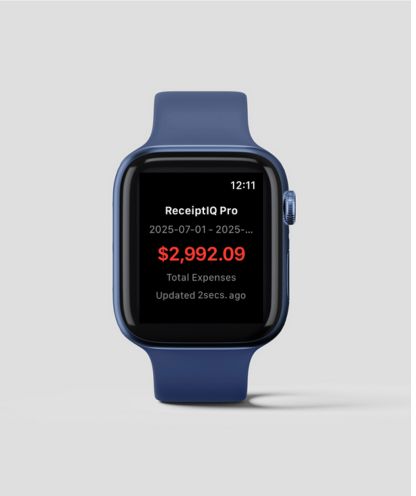
ReceiptIQ Pro running natively on Apple Watch
Expense Tracking at a Glance
The Apple Watch companion app for ReceiptIQ Pro is designed to give you instant access to your financial information without reaching for your phone. Whether you're checking your daily spending during lunch or verifying your budget before making a purchase, everything is just a wrist-raise away.
Key Features of ReceiptIQ Pro for Apple Watch
Current Expense Overview
View your weekly and monthly spending totals at a glance. The watch app syncs seamlessly with your iPhone to show real-time expense data, keeping you informed no matter where you are.
Budget Tracking Coming Soon
Check how you're doing against your budget goals. See remaining budgets for each category with clear visual indicators showing your progress throughout the month.
Recent Transactions Coming Soon
Quickly review your most recent expenses. Each transaction shows the merchant, amount, and category for easy reference when you need to recall recent purchases.
Smart Notifications Coming Soon
Receive intelligent alerts when you're approaching budget limits or when unusual spending patterns are detected. Stay proactive about your financial health.
Beta Launch: Help Us Make It Better
The Apple Watch app is currently in beta, which means we're actively working on improvements and new features. As an early adopter, your feedback is invaluable in shaping the future of ReceiptIQ Pro on Apple Watch.
Pro Tip
Make sure to enable notifications for ReceiptIQ Pro on your Apple Watch to get the most out of budget alerts and spending insights. You can configure this in the Watch app on your iPhone.
Coming Soon to Apple Watch
We're already working on exciting updates for the watch app, including:
- Quick expense entry: Add simple expenses directly from your watch using voice or the Digital Crown
- Complications: See your spending data right on your watch face without opening the app
- Weekly summaries: Get detailed spending breakdowns delivered to your wrist every Sunday
- Category insights: Dive deeper into spending patterns by category with visual charts
Quality Detection for Better Accuracy
Along with the Apple Watch app, we've also introduced Quality Detection in the latest update. This feature warns you when the AI might have difficulty reading certain receipt details, ensuring you can take action to maintain accurate expense records.
How to Get Started
- Update ReceiptIQ Pro to the latest version from the App Store
- Open the Watch app on your iPhone
- Scroll down to find ReceiptIQ Pro in the available apps list
- Tap "Install" to add it to your Apple Watch
- Launch the app on your watch and start tracking!
Important Note
The Apple Watch app requires ReceiptIQ Pro (not the standard ReceiptIQ Lite app) and is included with all Pro subscriptions at no additional cost. Make sure you have the Pro version installed on your iPhone first.
Your Feedback Matters
As we continue to develop the Apple Watch app, we'd love to hear your thoughts and suggestions. What features would make expense tracking on your wrist even better? Let us know through the feedback option in the app or reach out to our support team directly.
We're committed to making ReceiptIQ Pro the most convenient and powerful expense tracking solution available, and your input helps us get there.
Ready to Track Expenses on Your Wrist?
Update to the latest version of ReceiptIQ Pro and install the Apple Watch app today!
Update on App Store